
Skip to content

ShortShock Crew partnership proposal

From managing participants to compiling data,it's been a lot, hasn't it?

A proposal for people who run creator challenge communities. Watch the 26-second video first to see what we offer.

ShortShock Crew partnership proposal summary video. How it runs now: Verification screenshots, spreadsheet cleanup. Rankings by hand, too? Create a crew: Now, with ShortShock Crew. One crew per cohort, invites by email. Verification: Verify in one click. Views and engagement are recorded automatically. Team battles · Rankings: Team battles and individual rankings are tallied automatically every week. Performance report: When the season ends, use the performance report as is. Student tools: Analysis, planning, and upload tools at a steep discount for students. Brand campaigns: A first brand collaboration while still in the course. Partnership terms: Crew features free, creator tools at a steep discount, and a co-planned brand campaign beta. We'll show you in a 30-minute meeting.
Show transcript
  1. Verification screenshots, spreadsheet cleanup. Rankings by hand, too?
  2. Now, with ShortShock Crew. One crew per cohort, invites by email.
  3. Verify in one click. Views and engagement are recorded automatically.
  4. Team battles and individual rankings are tallied automatically every week.
  5. When the season ends, use the performance report as is.
  6. Analysis, planning, and upload tools at a steep discount for students.
  7. A first brand collaboration while still in the course.
  8. Crew features free, creator tools at a steep discount, and a co-planned brand campaign beta. We'll show you in a 30-minute meeting.

Crew takes over the work
hosts used to do every week

Participant management

Taking sign-ups, sending invites, and splitting people into teams

  • Crew creation and join approvals
  • Direct invites by email
  • Team creation and member assignment

Data collection

Gathering verification screenshots and copying them into spreadsheets

  • Verify straight from connected accounts
  • Views and engagement recorded automatically
  • Overall scores and performance reports compiled automatically

Keeping members engaged

Boosting motivation and keeping spirits up every week

  • Weekly mission progress and verification calendar
  • Team battles and individual rankings
  • Board comment feedback and chat

Running a cohort on Crew,
step by step

The structure you already use carries straight over to Crew. All of these features are free of charge.

Your community todayShortShock Crew
Cohort
Crew
Team
Team (group)
Curriculum period
Season
Weekly assignment
Weekly mission
Group chat verification
Connected account verification
  1. Step 1. Create a crew and invite students

    Create a crew for each cohort, then approve join requests or invite students directly by email.
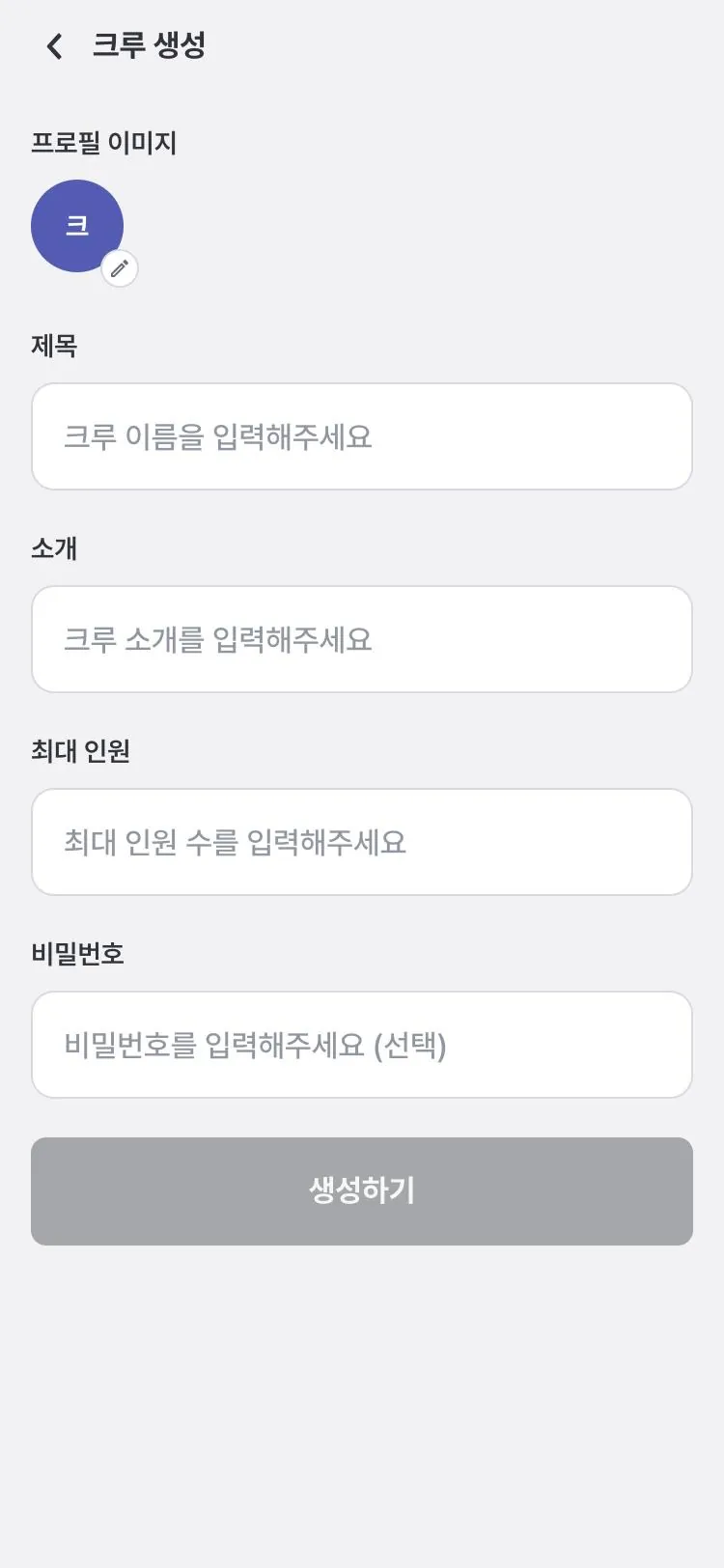
    Create crew screen: profile image, title, description, and max members fields
  2. Step 2. Set seasons and weekly missions

    Your curriculum period becomes a season, and the number of Reels and feed posts to publish each week becomes a mission.
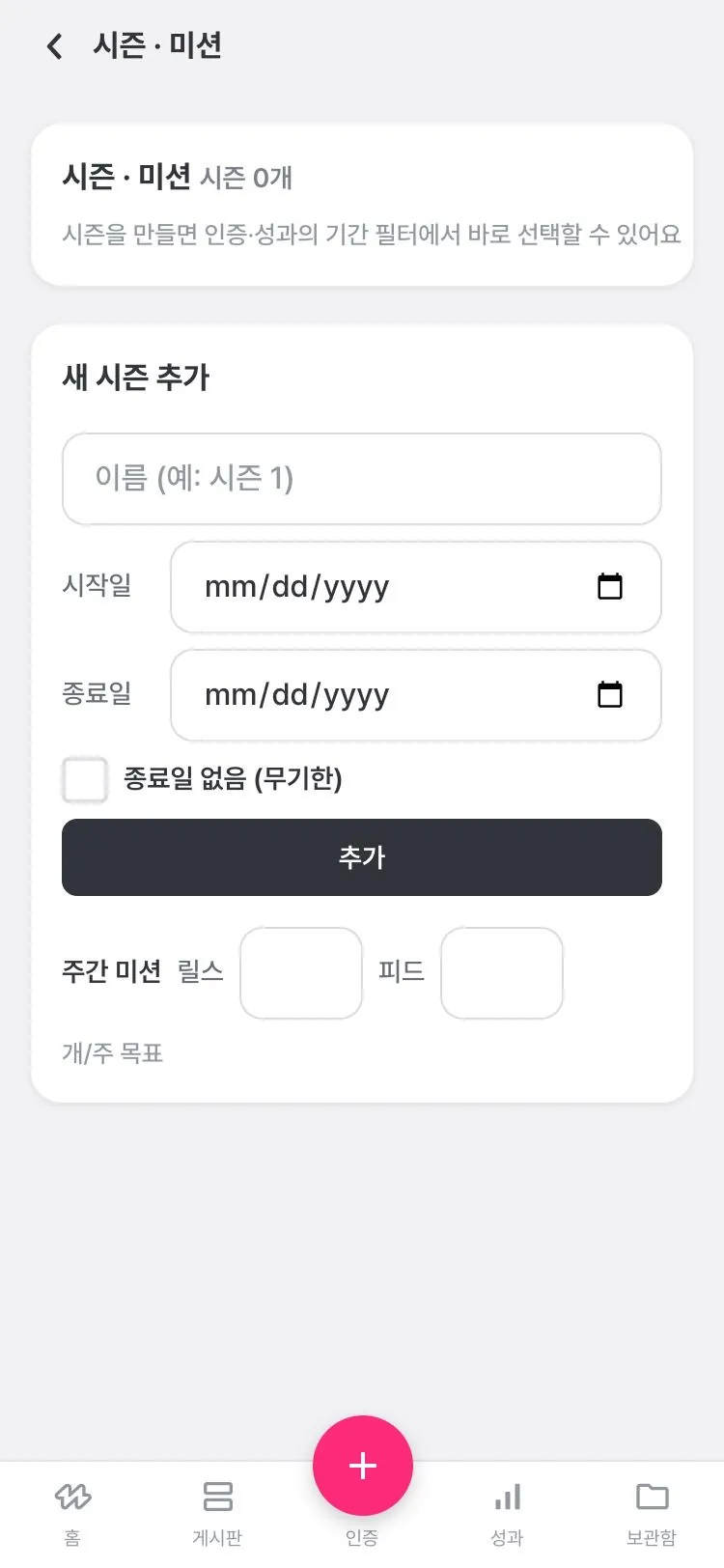
    Season and mission screen: season name, start and end dates, and weekly mission Reels and feed counts
  3. Step 3. Student verification

    Students pick content from their connected account to verify, and views and engagement are recorded along with it.
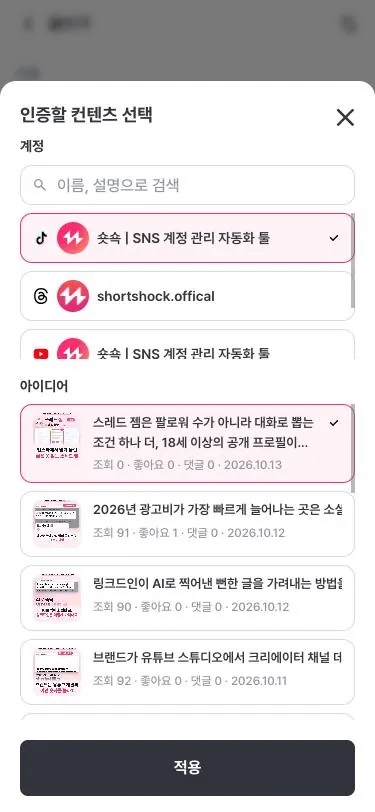
    Choose content to verify: selecting from a connected account's post list
  4. Step 4. My season record and verification calendar

    Students check their own crew rank, streak, and this week's mission progress.
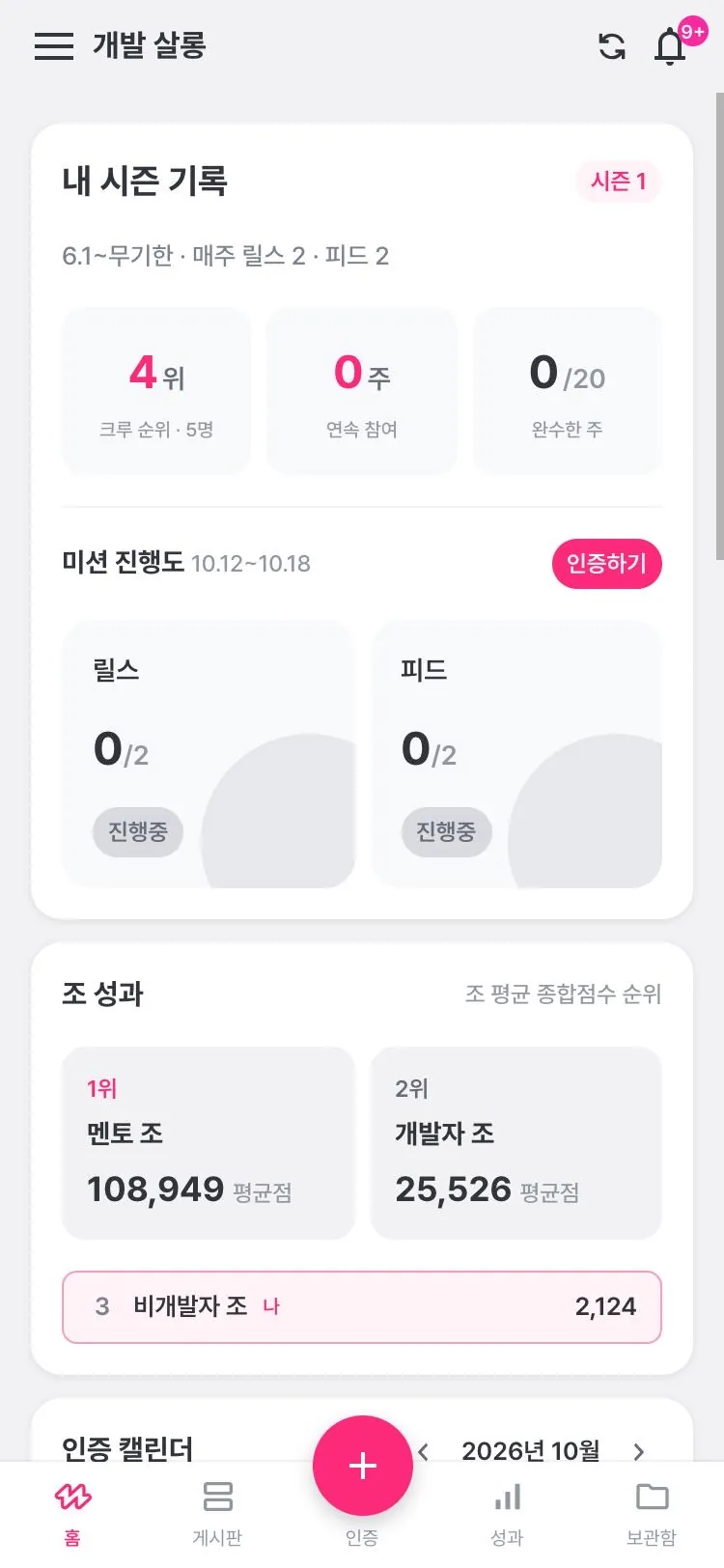
    My season record screen: rank, streak, mission progress, and team performance
  5. Step 5. Team battles and individual rankings

    The overall score reflects views, engagement, and posting frequency, and team battles are decided by each team's average. If one member sits out, the team average drops.
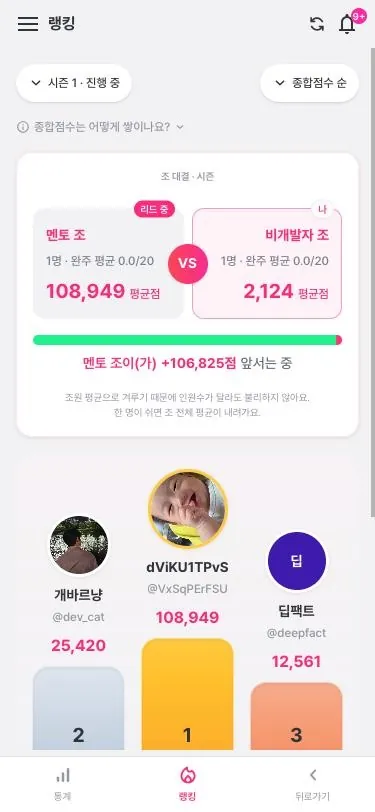
    Team battle screen: two teams' average overall scores and the gap between them
  6. Step 6. Performance report

    Cumulative season views, each student's standing in the crew, and weekly growth charts go straight into your end-of-cohort report.
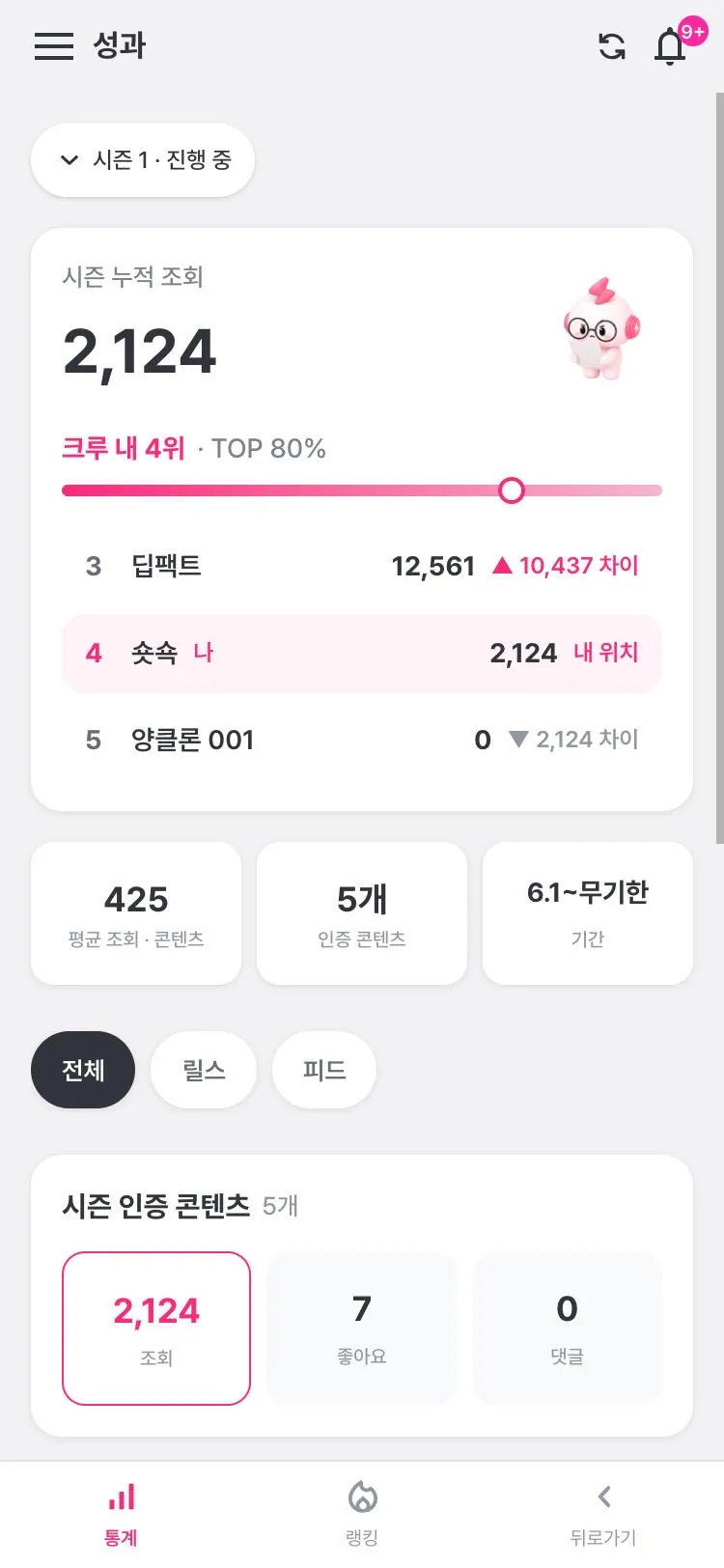
    Season performance screen: cumulative views, rank within the crew, and number of verified posts
  7. Step 7. Board and comment feedback

    Members comment on verification posts and shared references, and tag each other with @.
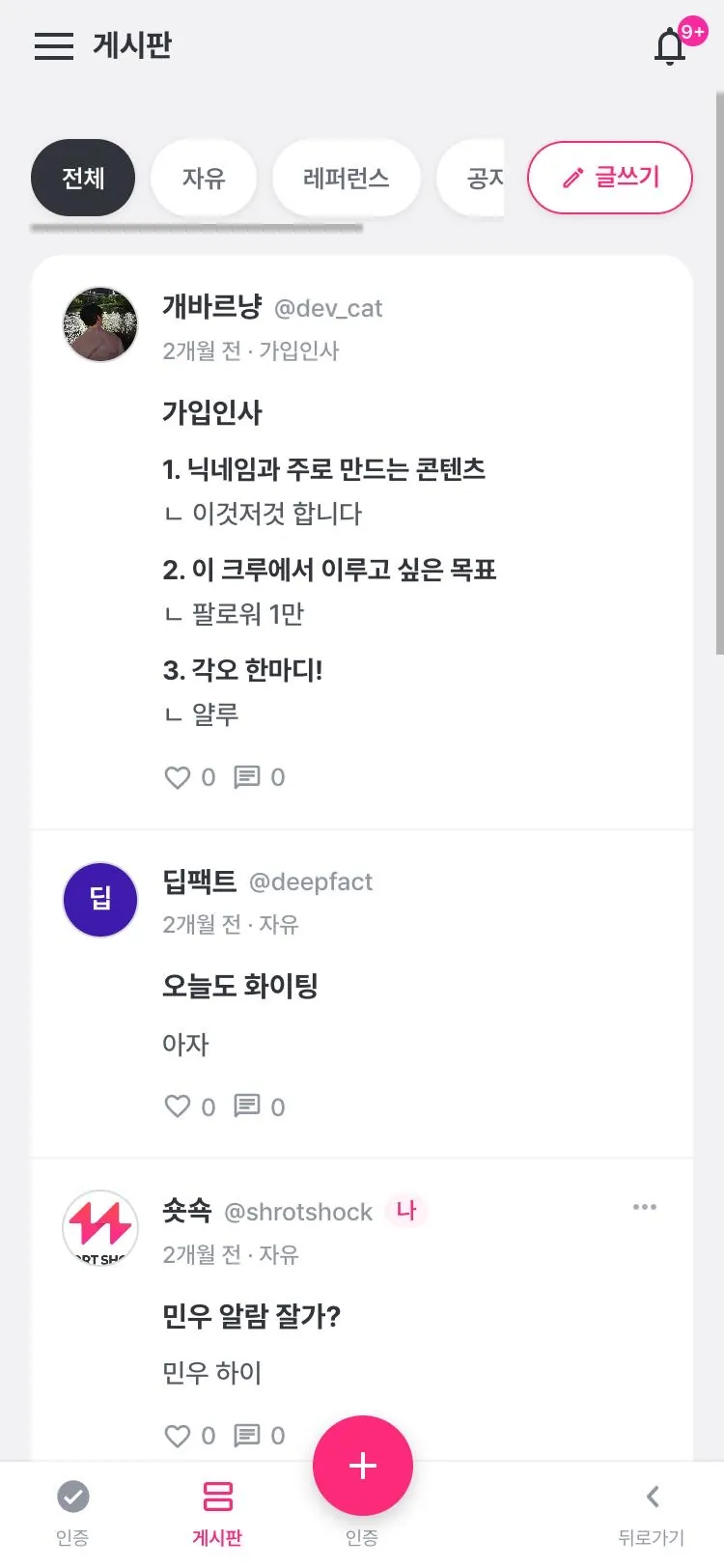
    Board screen: Free, Reference, and Notice tabs with a post list

We also help them create
the content they'll post

Six tools that connect in one app, from looking back to tracking stats. Your students get them at a discount.

AI analysis of your videos

Pick up to 5 of your posted videos, request an AI analysis, and carry the results into your next plan.
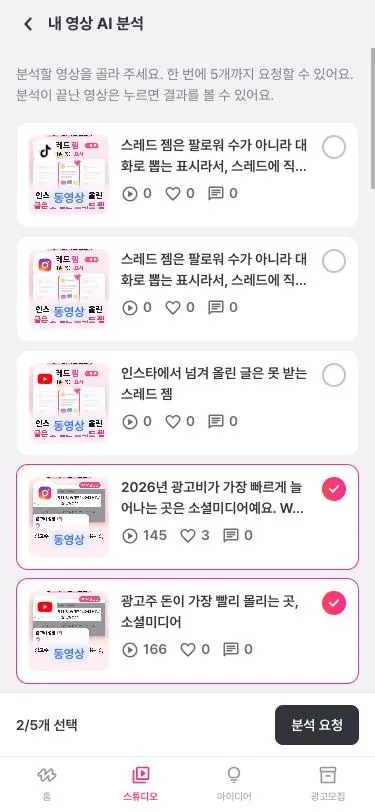
  • A retrospective tool for looking back at the videos you verify each week
  • Request it right from a project's Stats screen, too
AI review of my videos screen with two videos selected

In beta

Your students' first brand deal,
built together

Brands post campaigns, and creators receive briefs and request to join. Ahead of the official launch, we're looking for partners to build the creator pool with us.

BeautyFoodTravel
  1. 1

    Post a campaign

    The brand sets the category, channel profile, and terms

  2. 2

    Sign up as a creator

    Creators pick their interests, like beauty, fashion, food, or travel

  3. 3

    Get briefs, request to join

    They receive briefs in their field and request to join

  4. 4

    Chat and create

    They create the content while talking with the brand in campaign chat

First sponsorship, mid-course

Students get campaigns before the official launch and work with real brands.

Their record is their portfolio

Season overall scores and completed weeks become material to show brands.

Brand missions in the curriculum

One week runs as a mission in the format of a real campaign.

Partnership terms

Operating tools are free, student tools are discounted, and brand collaboration is something we'll build together from the beta. Items not yet settled are marked TBD.

Crew features

Free

Who
Every cohort and team crew you run
Terms
Free for the partnership term Term TBD
Applies
From crew setup

Creator tools

Steep discount

Who
Your students
Terms
Special student-only pricing Discount rate and term TBD
Applies
Method TBD

Brand campaigns

Beta partnership

Who
Your students who opt in
Terms
Set based on beta results Revenue share and matching criteria TBD
Applies
Once opted-in students register as creators

Expected benefits

Community operators

  • Less time spent checking verifications and tallying rankings
  • Performance data builds up automatically for each cohort
  • Weekly missions and team battles to keep completion rates up
  • Broader student benefits through linked campaigns

Students

  • A reason to verify every week, and a team cheering them on
  • Peer feedback in comments on verification posts and references
  • Uploads and stats for multiple platforms in one place
  • From analyzing their own videos to planning the next one
  • Brand collaboration experience while still in the course

Timeline

We'll set exact dates around your next cohort's schedule.

  1. Step 1. Kickoff

    About 1 week

    Interview on how you operate; finalize the free scope and discount terms

  2. Step 2. Crew setup

    About 1 week

    Set up crews, seasons, and missions; invite students and guide them through connecting accounts

  3. Step 3. Run the season

    During the cohort

    Weekly verification and team battles; ShortShock shares regular status updates

  4. Step 4. Season review

    About 1 week after it ends

    Compile the performance report; improve for the next cohort

  5. Step 5. Connect campaigns

    Timing TBD

    Register interested students; pilot the first brand campaign

Frequently asked questions

What is ShortShock Crew?
It's a ShortShock feature that helps creator challenge communities run challenges by cohort and team. It includes crew creation and invitations, seasons and weekly missions, connected account verification, team battles and individual rankings, performance reports, and a board with comment feedback.
Does the crew feature cost anything?
It's free for the duration of the partnership. It applies to every cohort and team crew you run, starting from crew setup, and the period is open to discussion.
What do students get?
Students get creator tools at a special student price: AI analysis of their own videos, reference saving and sharing, reference analysis, storyboard planning, simultaneous upload, and multichannel stats. The discount rate and how it applies are open to discussion.
Can students do brand collaborations too?
Brand campaigns are currently in beta. Students who sign up as creators join the beta creator pool first and get notified of new campaigns, and we plan brand mission seasons together with you. Revenue sharing and matching criteria will be finalized based on the beta results.
How do we get started?
In a 30-minute meeting, we learn how you run things, then set up a crew in advance for your next cohort and demo it. Kickoff and crew setup each take about a week, and exact dates are set around your next cohort's schedule.

Request a
30-minute meeting

We'll hear how you run your program, then set up a crew for your next cohort in advance and walk you through it.

Request a meeting by email

Minwoo Jin

ShortShock

minu@shortshock.com

See the app at app.shortshock.net

App screens were captured from the app.shortshock.net mobile view on Oct 13, 2026; the storyboard planning screen is a design provided by ShortShock. The reference archive and the illustrations above were drawn to explain the structure. Names and numbers in the hero and on screen are examples, not real data.